 Fotaro
How to Make Photo Collages and Instagram Story Templates on Your Phone
Layouts that look designed, not crammed: how to choose photos, pick a grid or a template, and make posts and stories in minutes.
A good collage tells a small story in one picture: a trip, a birthday, a week, a recipe. A bad collage is nine random photos squeezed into tiny boxes.
Templates do the same for stories: a ready layout with places for photos and words, so your post looks planned even when you made it on the bus.
This guide covers how to choose photos for a collage, which layout to use when, and how to make collages and story templates on your phone.
Choosing photos for a collage
The layout matters less than the photos you put in it.
- Fewer is better. Three to six photos usually look better than nine. Each photo gets enough space to be seen.
- One hero. Pick one strong photo and give it the biggest space. The others support it.
- Variety. Mix a wide shot (the place), a medium shot (people) and close-ups (food, hands, details).
- Matching colours. Photos with similar light and colour look like one set. If they do not match, put the same look on all of them.
- Faces away from the edges. Collage boxes crop photos. Check that no one loses their chin.
Grid or free?
- Grid collages put photos in neat boxes. Clean and easy to read. Good for recaps, before and after, products and recipes.
- Free collages let photos overlap, turn and sit at different sizes, like prints scattered on a table. Good for scrapbook and "photo dump" moods.
Details that make a collage look designed
- Borders. A thin white or black border between photos gives breathing room. No border gives a modern, seamless look.
- Rounded corners feel softer and friendlier; square corners feel cleaner.
- Background colour. Pick a colour from one of the photos, such as the sky or a dress, so it feels connected.
- Shape for the place. 4:5 for Instagram posts, 9:16 for stories, 16:9 for YouTube or WhatsApp status on a wide screen.
Story templates: a shortcut to a planned look
A template is a layout someone has already designed: places for photos, words in a chosen font, colours, maybe a sticker. You add your photos and change the words.
Templates are great for:
- Regular posts: "Week in photos", "Outfit of the day", "Recipe".
- Events: birthdays, invitations, "Save the date".
- Small businesses: a sale, a new product, prices.
- Travel: "I was here", a boarding pass style, from-to routes.
The trick is to make the template your own: change the words, use your own colours, and keep one or two templates for a series so your profile looks consistent.
How to do it in Fotaro
Fotaro is a free photo and video editor for Android with a collage maker and 68 story and post templates.
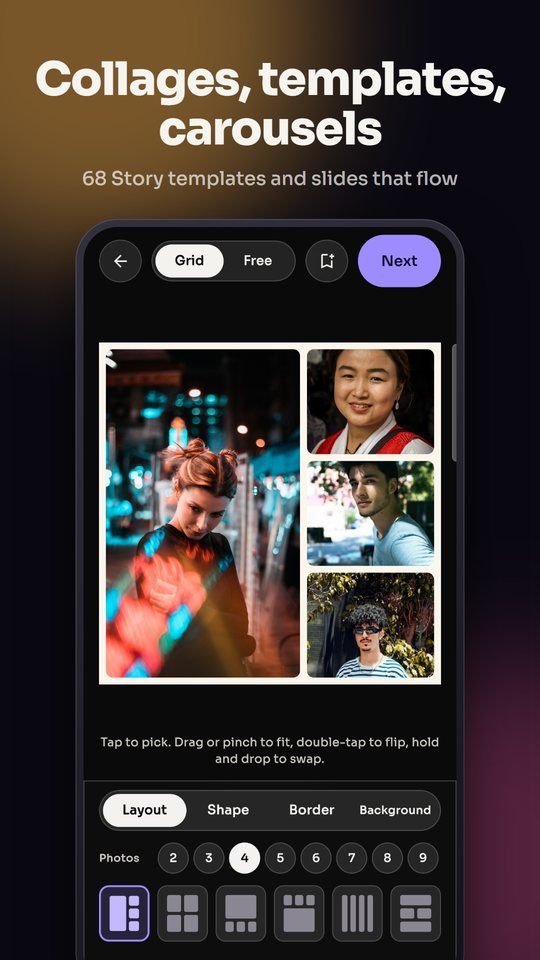
A collage:
- Open Fotaro and tap Collage in the Create section.
- Pick 2 to 9 photos.
- Choose Grid or Free layout.
- In a grid, drag or pinch a photo to fit its box, double-tap to flip it, and hold and drop to swap two photos. In free layout, drag photos and pinch with two fingers to size and turn them.
- Set Border, Corners, Background and Edges (for example the instant-photo edge or a shadow).
- Choose where it is for: Post, Story, Wide or Photo, then save.
A template:
- Tap Templates in the Create section.
- Choose Story or Post, then a kind: Travel, Birthday, Food, Recipe, Quote, Week in photos, Outfit, Sale, Event, Fitness, Love, Music, Recap or Frames.
- Tap Use and pick your photos; they fill the template's places.
- Tap the words to type your own; Font and Card change the look.
- Tap Next to open it in the editor for a look or stickers, then save.
Your own template: in Mine, tap New template to place photo spots, words, stickers and shapes yourself. Save it once and reuse it every week.
Ideas
- Trip recap: one hero landscape, four smaller photos of food and people, a thin white border.
- Week in photos: a weekly template, same colours every week.
- Recipe card: the finished dish big, steps small, ingredients in words.
- Shop post: a sale template with your product photos cut out on white.
The short version
Choose fewer photos, one hero, matching colours. Use a grid for clarity and free placing for a scrapbook mood. For stories, start from a template, make the words and colours your own, and keep a template or two for a regular series.
About Fotaro
Fotaro is a free photo and video editor for Android from Toolverse Labs: a collage maker with grids or free placing for 2 to 9 photos, and 68 story and post templates, plus your own. No account, no watermark, and editing runs on your phone.
Fotaro is free on Android: no account, no watermark, and editing runs on your phone.
Get it on Google Play