 Fotaro
How to Compress Photos and Videos for WhatsApp and Email Without Ruining Them
Why files get blocked or blurry when you send them, and how to make photos, videos and sound smaller on your phone while they still look the same.
You try to email a few videos and the mail app says the attachment is too large. You send photos on WhatsApp and they arrive blurry. A job portal wants your photo "under 200 KB". Your phone storage is full of 4K videos you will watch once.
All of these are the same problem: the file is bigger than it needs to be for where it is going. This guide explains what makes files big, how to shrink them without visible loss, and how to do it on your phone.
Why phone files are so large
- Photos: modern phones take 12 to 50 megapixel photos. A single photo can be 3 to 8 MB, and much larger in RAW.
- Videos: 4K at 60 frames per second can use 300 to 400 MB per minute.
- Sound: WAV recordings are uncompressed and take about 10 MB per minute.
That detail is useful for printing or editing. For a phone screen, an email or a chat, most of it is invisible.
What compression actually changes
There are four levers, and good compression uses them carefully:
- Resolution. A photo shown on a phone screen does not need 8000 pixels across; 2000 is plenty. A video watched on a phone looks almost the same in 1080p as in 4K.
- Quality setting. JPEG and video codecs can store a picture with more or less precision. Moderate settings look identical to the eye and are much smaller.
- Codec. Newer video codecs such as H.265 (HEVC) store the same quality in roughly half the size of older H.264.
- Extra data. Photos carry hidden info: location, camera model, time. Removing it saves a little space and protects your privacy.
What chat apps do to your files
WhatsApp, Instagram and most chat apps compress everything you send, automatically and aggressively. That is why photos arrive soft. You cannot turn it off for normal photos, but you have two options:
- Send as a document (in WhatsApp, use the document option). The file arrives untouched, but must be under the app's file size limit.
- Compress it yourself first, so you control the quality. The chat app then has less to squeeze.
How much is enough?
Good targets for common jobs:
- WhatsApp or Telegram photos: around 2000 px on the long side, JPEG, 1 to 2 MB.
- Email attachments: many email providers cap attachments at around 20 to 25 MB in total. A one-minute 1080p H.265 video is often 20 to 40 MB, so short clips fit and longer ones may need 720p.
- Forms and job portals: often 100 to 500 KB for a photo. Use a smaller size and lower quality.
- Archiving your own videos: 1080p H.265 at a balanced setting keeps them watchable at a fraction of the size.
Always keep the original
Compression is one-way: once detail is thrown away, it is gone. Make the smaller version as a new copy and keep the original, at least until you have checked the result.
How to do it in Fotaro
Fotaro is a free photo and video editor for Android with a Compress tool for photos, videos and sound files. It makes new copies, so your originals stay as they are.
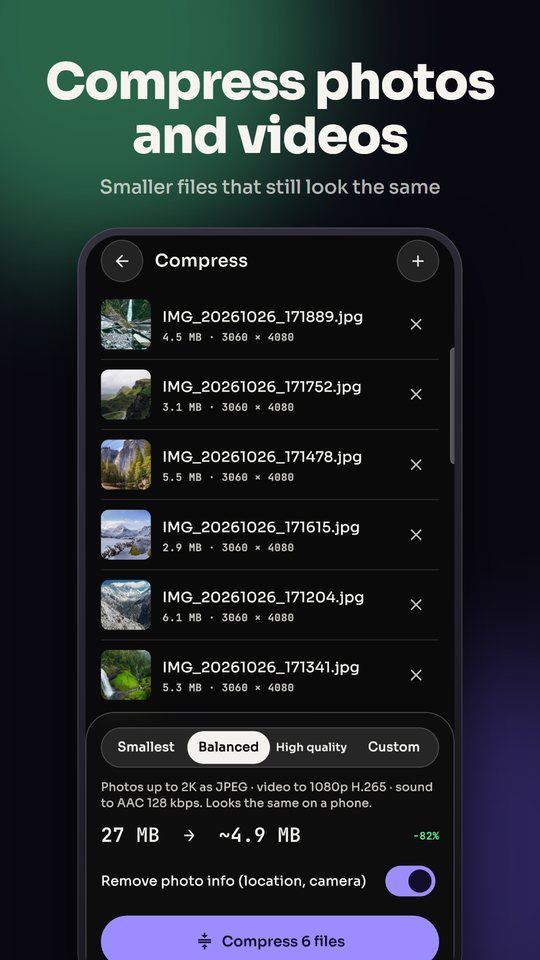
- Open Fotaro and tap Compress in the Tools section of the Home screen.
- Tap Add files and pick photos, videos or sound files. You can mix them.
- Choose a preset:
- Smallest: photos up to 1080p as JPEG, video to 720p H.265, sound to AAC 96 kbps. Small enough to send anywhere.
- Balanced: photos up to 2K, video to 1080p H.265, sound to AAC 128 kbps. Looks the same on a phone.
- High quality: photos and video at full size, sound to AAC 192 kbps. Hard to tell apart from the original.
- Custom: set format, quality, resolution, frame rate, or a size to fit under, for forms with a limit.
- Turn on Remove photo info to take out the location and camera details before you share.
- Tap Compress. Fotaro shows how much space was saved, and if a file would not come out smaller, it says so instead of making a bigger copy.
- The new copies are saved in Pictures, Movies and Music › Fotaro, ready to send.
Tips
- Check one file first. Compress one video, watch it on your phone, then do the rest with the same setting.
- Trim before you compress. Cutting the boring first ten seconds of a video saves more than any setting.
- Do not compress twice. Each round loses a little more. Always start from the original.
- Remove location from photos you post publicly. A photo taken at home can reveal your address.
The short version
Big files are big because of resolution, quality, codec and hidden data. For phones, chats and email, 2K photos and 1080p H.265 videos look the same and are a fraction of the size. Make new copies, keep the originals, and strip location info from anything you share publicly.
About Fotaro
Fotaro is a free photo and video editor for Android from Toolverse Labs: Compress makes photos, videos and sound files smaller as new copies that look the same, and removes location info from photos. No account, no watermark, and editing runs on your phone.
Fotaro is free on Android: no account, no watermark, and editing runs on your phone.
Get it on Google Play